Back to Blog
This article is intended for malware analysts, investigators, and security system developers, and explains the key tactics used by malware authors to detect and evade virtual environments often used in the security analysis process. The article will detail the key anti-VM tactics we’ve encountered during our research activity and will provide information allowing you to:
- Understand how malware authors detect when malware is running in a virtual environment
- Harden your security systems to reduce the odds of evasion
- Identify anti-VM behavior in order to improve detection.
About VMs and Sandboxes
Malware analysts and investigators often use isolated environments, such as virtual machines (VMs) or sandboxes, to analyze unknown code for malware. In the same manner security products often use VM’s and sandboxes to execute potentially malicious code before it is approved to enter the organizational network.
In an attempt to evade analysis and bypass security systems malware authors often design their code to detect isolated environments. Once such an environment is detected the evasion mechanism may prevent the malicious code from running, or it may alter the malware’s behavior to avoid exposing malicious activity while running in a VM.
For example: when running on real hardware the malware will connect to its Command and Control (C&C) server, but when a VM is detected it will connect to a legitimate domain causing the analyst or the security system to believe this is legitimate code.
How Malware Authors Identify Virtual Machines
Virtual machine software is designed to mimic the hardware functionality of real hardware. But when doing so, some artifacts remain, which help indicate that it is indeed a virtual machine and not a physical one. These kind of artifacts can be specific files, processes, registry keys, services, network device adapters etc.
Malware authors take advantage of this “design flaw”. They code the malware to detect virtual machine configuration files, executables, registry entries or other indicators in order to manipulate their original execution flow. This behavior is referred to as “Anti-Sandbox” or “Anti-VM”.
Virtualization Detection Methods
Throughout our ongoing malware research, we’ve encountered multiple tactics used by malware authors for detecting sandboxes in general, and virtual environments in specific. The following section will focus on tactics for detecting virtualization technologies. Malware authors implement this in various ways such as: Windows API, WMI queries or specific CPU instructions.
We advise analysts and investigators to use this information in order to harden their VM analysis environments and improve evasion resiliency. Reducing the presence of these indicators in your environments will make it harder for attackers to identify and potentially bypass the VM or fool the analyst.
Some of the methods described herein can be monitored by automatic analysis systems and added as behavioral signatures indicating potential malicious activity, in order to improve detection.
1. Checking CPU Instructions:
The result of the following instructions with specific input can help malware identify virtual environments:
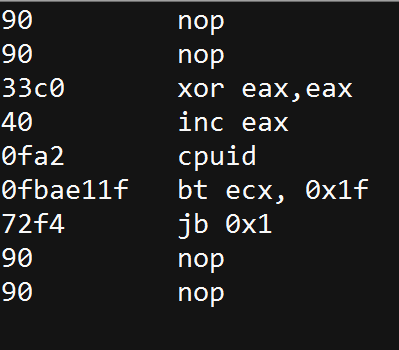
- CPUID: This instruction is executed with EAX=1 as input, the return value describes the processors features. The 31st bit of ECX on a physical machine will be equal to 0. On a guest VM it will equal to 1.
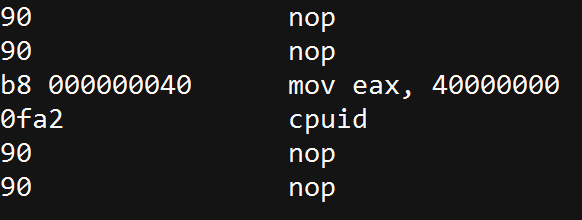
- “Hypervisor brand”: by calling CPUID with EAX=40000000 as input,1 the malware will get, as the return value, the virtualization vendor string in EAX, ECX, EDX.
For example:- Microsoft: “Microsoft HV”
- VMware : “VMwareVMware”
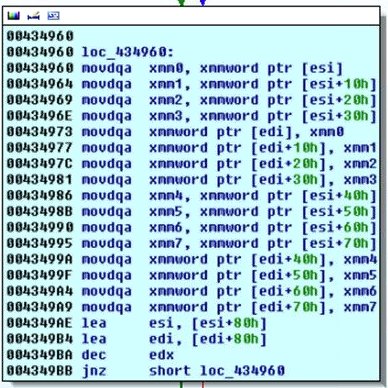
- MMX: an Intel instruction set, designed for faster processing of graphical applications. These are usually not supported in Virtual Machines so their absence may indicate that the malware is running in a VM.
For example:
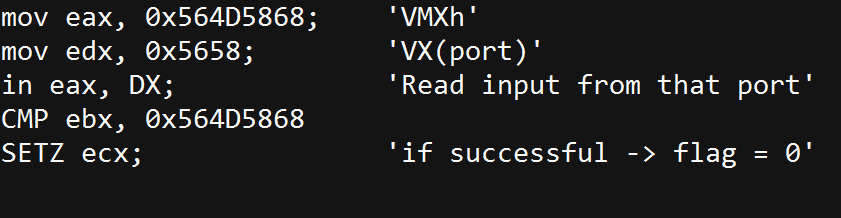
- IN – “VMWare Magic Number”: this technique is useful for detecting a VMware environment. In VMWare, communication with the host is done through a specific I/O port. The code below will execute successfully if running inside a VM. Otherwise it will fail.
2. Checking for Known Mac Addresses:
Prefixes of MAC addresses indicate the network adapter’s vendor. The MAC address can be retrieved in multiple ways, including the using of WMIC (wmic -> nic list)
- 00:05:69 (Vmware)
- 00:0C:29 (Vmware)
- 00:1C:14 (Vmware)
- 00:50:56 (Vmware)
- 08:00:27 (VirtualBox)
3. Checking for Registry Keys
The existence of the following registry entries indicates the existence of virtualization software:
- HKLM\SOFTWARE\Vmware Inc.\\\Vmware Tools
- HKEY_LOCAL_MACHINE\HARDWARE\DEVICEMAP\Scsi\Scsi Port 2\Scsi Bus 0\Target Id 0\Logical Unit Id 0\Identifier
- SYSTEM\CurrentControlSet\Enum\SCSI\Disk&Ven_VMware_&Prod_VMware_Virtual_S
- SYSTEM\CurrentControlSet\Control\CriticalDeviceDatabase\root#vmwvmcihostdev
- SYSTEM\CurrentControlSet\Control\VirtualDeviceDrivers
4. Checking for Processes Indicating a VM
Any of the following processes may indicate a virtual environment. Malware can retrieve this info in multiple ways like: WMIC, Win API and CMD. WMIC (wmic -> process list), Win API (Process32First, Process32Next), and Tasklist.exe.
- Vmware
- Vmtoolsd.exe
- Vmwaretrat.exe
- Vmwareuser.exe
- Vmacthlp.exe
- VirtualBox
- vboxservice.exe
- vboxtray.exe
5. Checking for Existence of Files Indicating a VM
When these files are found to exist in the file system, this may indicate the existence of virtualization software. These can also be retrieved in multiple ways like: WMIC, Win API and CMD.
- VMware
C:\windows\System32\Drivers\Vmmouse.sys
C:\windows\System32\Drivers\vm3dgl.dll
C:\windows\System32\Drivers\vmdum.dll
C:\windows\System32\Drivers\vm3dver.dll
C:\windows\System32\Drivers\vmtray.dll
C:\windows\System32\Drivers\VMToolsHook.dll
C:\windows\System32\Drivers\vmmousever.dll
C:\windows\System32\Drivers\vmhgfs.dll
C:\windows\System32\Drivers\vmGuestLib.dll
C:\windows\System32\Drivers\VmGuestLibJava.dll
C:\windows\System32\Driversvmhgfs.dll
- VirtualBox
C:\windows\System32\Drivers\VBoxMouse.sys
C:\windows\System32\Drivers\VBoxGuest.sys
C:\windows\System32\Drivers\VBoxSF.sys
C:\windows\System32\Drivers\VBoxVideo.sys
C:\windows\System32\vboxdisp.dll
C:\windows\System32\vboxhook.dll
C:\windows\System32\vboxmrxnp.dll
C:\windows\System32\vboxogl.dll
C:\windows\System32\vboxoglarrayspu.dll
C:\windows\System32\vboxoglcrutil.dll
C:\windows\System32\vboxoglerrorspu.dll
C:\windows\System32\vboxoglfeedbackspu.dll
C:\windows\System32\vboxoglpackspu.dll
C:\windows\System32\vboxoglpassthroughspu.dll
C:\windows\System32\vboxservice.exe
C:\windows\System32\vboxtray.exe
C:\windows\System32\VBoxControl.exe
6. Checking for Running Services
Identifying whether one the following processes is running indicates a virtual environment.
These can also be retrieved in multiple ways WMIC, Win API and CMD
(wmic -> Service list, sc.exe /query)
- VMTools
- Vmhgfs
- VMMEMCTL
- Vmmouse
- Vmrawdsk
- Vmusbmouse
- Vmvss
- Vmscsi
- Vmxnet
- vmx_svga
- Vmware Tools
- Vmware Physical Disk Helper Service
Conclusion
Malware authors eventually find virtual machine and sandbox evasion techniques that will work.
Organizations should:
- Be aware of the evasion tactics so they can harden their environments
- Use this knowledge to identify VM evasion tactics and improve malware detection
- Look for advanced security approaches that are harder to identify and evade. IDS systems, for example, often use sandboxes to run and test suspicious code, however, advanced endpoint protection does not use sandboxes which are easy to identify and therefore these evasion tactics are not feasible.
As further reading, we recommend this SANS white paper detailing sandbox evasion tactics.
By Yaniv Assor, Senior Malware Analyst & Alon Slotky, Head of Behavioral Research, Cyberbit Advanced Malware Research Group