Back to Blog
- SSRF - Server Side Request Forgery
- IMDSv2 to the rescue!
- Enforcing IMDSv2 for new instances
*The blog post was updated on May 2020.
AWS EC2 instance metadata service (IMDS) has been in use by AWS customers for a long time, even though they don’t always realize it. IMDS provides a great deal of information about the instance and is very useful for application configuration. In this article, I would like to talk about the impact of this service on the security of the instance and how to apply mitigations, based on the new IMDSv2. I hope the content is beneficial not only to the “hands-on” security people but also for architects, operators, developers and auditors.
SSRF – Server Side Request Forgery
We all fear SSRF – Server Side Request Forgery, especially in conjunction with the IMDS service. According to some sources, the recent Capital One breach used it. In a nutshell, SSFR is an attack in which the server has permission to do something I would like to do, so I ask the server to do it for me. Sounds fairly innocuous, unless I ask it to do something malicious, like give me the list of all users in the user repository. Under normal circumstances, this shouldn’t be possible, but when there is a misconfiguration or a poorly designed application, it could lead to dire consequences.
IMDS provides a plethora of metadata. One of these metadatum is the reason IMDS could be exploited to provide a malicious user with instance-level credentials (i.e. permissions for the role associated with the instance) for the duration of the temporary credentials *if* the malicious user has been able to perform an SSRF attack against the instance. Let’s see how it looks from the instance itself:

curl http://169.254.169.254/latest/meta-data/iam/security-credentials
IMDS-demo
We see that there is a role called IMDS-demo. For the sake of demonstration, I have granted this role with AWS managed role called AmazonEC2ReadOnlyAccess. Let’s give it a try:

aws ec2 describe-instances –query ‘Reservations[*].Instances[*].[InstanceId, IamInstanceProfile.Arn]’ –output text –region us-east-2
i-0eb7d73d57b4292c6 arn:aws:iam::[ACCOUNTID]:instance-profile/IMDS-demo
OK, so far we see that IMDS works and we are able to execute commands based on the instance role. Now, let’s expose the role credentials:
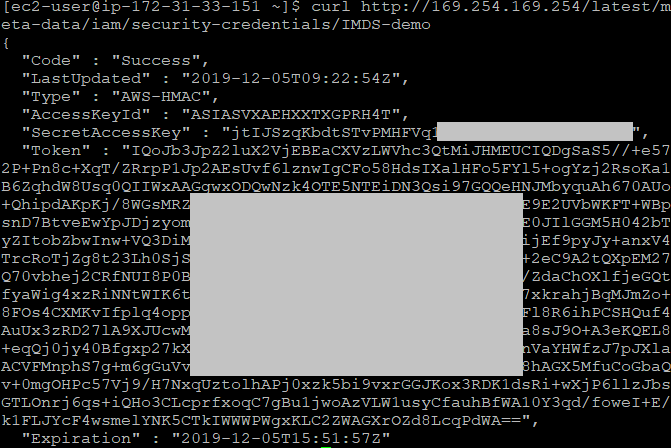
curl http://169.254.169.254/latest/meta-data/iam/security-credentials/IMDS-demo
{
“Code” : “Success”,
“LastUpdated” : “2019-12-03T07:15:34Z”,
“Type” : “AWS-HMAC”,
“AccessKeyId” : “xxxxxxxxxxxxxxxxxxx“,
“SecretAccessKey” : “xxxxxxxxxxxxxxxxxxxxx“,
“Token” : “xxxxxxxxxxxxxxxxxxxxx“,
“Expiration” : “2019-12-03T13:50:22Z”
}
Now, the problem is that once these credentials are in the hands of the attacker, he can use them from anywhere, even from outside AWS. Let’s see how it works on my computer. First, we can see that the AWS Powershell is not configured:

Get-EC2Instance -Region us-east-2
Get-EC2Instance : No credentials specified or obtained from persisted/shell defaults.
I have set the secret values obtained from the IMDS as variables called AccessKeyId, SecretAccessKey and Token and ran the command again, using these values:
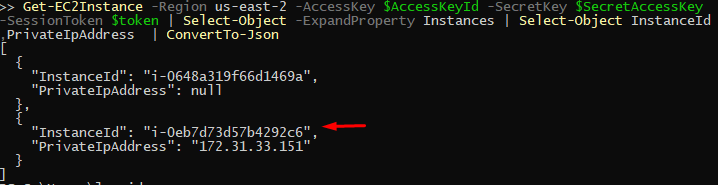
Get-EC2Instance -Region us-east-2 –AccessKey $AccessKeyId –SecretKey $SecretAccessKey –SessionToken $token | Select-Object –ExpandProperty Instances | Select-Object InstanceId,PrivateIpAddress | ConvertTo-Json
{
“InstanceId“: “i-0eb7d73d57b4292c6”,
“PrivateIpAddress“: “172.31.33.151”
}
This demonstrates the problem quite well. If the instance role holds permissions to read from S3 buckets for example, I would now be able to read the data from these buckets directly to my computer. While the credentials obtained this way are time-limited, as long as I have access to the instance’s metadata, I can get new credentials every time.
I have looked for a solution for this for quite some time and surprisingly, there was no straightforward solution and most importantly, none that are simple to implement. Every possible solution had various complexities and drawbacks.
IMDSv2 to the rescue!
The main blog post by AWS regarding IMDSv2 explains it in great detail, so I will discuss the additional security measures in brief:
- With IMDSv2, you must obtain a token by performing a PUT request and this is not possible to achieve in most cases remotely.
- When passing through a proxy, a header called X-Forwarded-For is usually added. If IMDSv2 detects this header, it will not respond to the request.
- The instance contacts the metadata service directly, i.e. using a single network hop. If the request originates remotely, such as with a remote attack over the network, the number of hops will likely be greater. The default number of hops IMDSv2 is configured with is 1 (single hop), meaning that the packet will be dropped on the way and will not reach the attacker.
How to Enable IMDSv2 and Mitigations
Now let’s discuss the considerations, how to enable IMDSv2 and some mitigations around it.
First and foremost, it is important to understand that if you do nothing, both IMDSv1 and IMDSv2 are available to the instance. Meaning, just having access to IMDSv2 does not improve your security posture; you must actively disable IMDSv1!
Considerations:
- Make sure your SDK / any type of software client you use on the instance is capable of supporting IMDSv2. If it is, the software client will continue to work using IMDSv2 with no issues.
Do not underestimate the importance of IMDSv1! Since enabling the CloudWatch+Lambda automatic solution to disable IMDSv1, I have seen many cases of various 3rd party scripts and agents that are broken by disabling IMDSv1. Literally anything coming from the AWS marketplace and having some interaction with AWS or IMDS data sources have been broken by automatically disabling IMDSv1. So again, make sure that you test this thoroughly before broadly disabling IMDSv1 in your accounts, update your operational teams of the possible consequences and have an exception model in place. I use a specific “exception” tag so that if the Lambda is detecting an instance launch and the instance have IMDSv1 enabled, the first thing it will check if there is an “exception” tag present; if the answer is “yes”, this instance is skipped from IMDS configuration and an appropriate event is written to a CloudWatch log. - If your applications or scripts extract credentials from the instance metadata as I described in the intro, make sure they are updated to use the access token.
- Currently, there is no possibility to automatically disable IMDSv1 on instances at their creation – account-wide. If you would like this to be enforced, you need to take action – as described later in this article.
- AWS has added the possibility to select the IMDS version during instance launch in the AWS Console. It is near the user data selection, in the “Advanced Details” section of the “Configure Instance” screen.
- An additional consideration point is that in many cases new instances are created automatically via Auto Scaling groups (ASGs). Currently, launch templates support IMDS version configuration during launch while launch configurations do not support the instance metadata parameter.
Restrict a single machine to IMDSv2
First, in order to see if the instance is already configured to use IMDSv2, let’s check the instance’s properties:
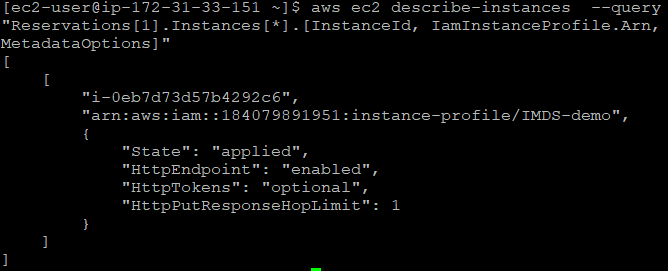
aws ec2 describe-instances –query “Reservations[*].Instances[*].[InstanceId, IamInstanceProfile.Arn, MetadataOptions]”
“i-0eb7d73d57b4292c6”,
“arn:aws:iam::[ACCOUNTID]:instance-profile/IMDS-demo”,
{
“State”: “applied”,
“HttpEndpoint“: “enabled”,
“HttpTokens“: “optional”,
“HttpPutResponseHopLimit“: 1
}
Note the “HttpTokens“: “optional” configuration – it means that IMDSv2 is optional. Now, let’s force this instance to use IMDSv2. I will run this command from a management machine with appropriate EC2 permissions:
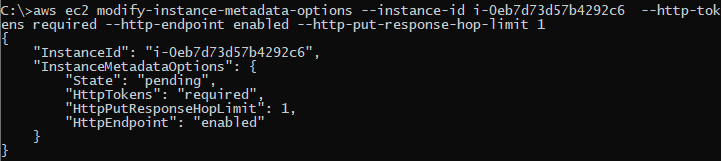
aws ec2 modify-instance-metadata-options –instance-id i-0eb7d73d57b4292c6 –http-tokens required –http-endpoint enabled
{
“InstanceId“: “i-0eb7d73d57b4292c6”,
“InstanceMetadataOptions“: {
“State”: “pending”,
“HttpTokens“: “required”,
“HttpPutResponseHopLimit“: 1,
“HttpEndpoint“: “enabled”
}
}
The state is pending, however, issue another describe-instances command and you will see that it is now set:
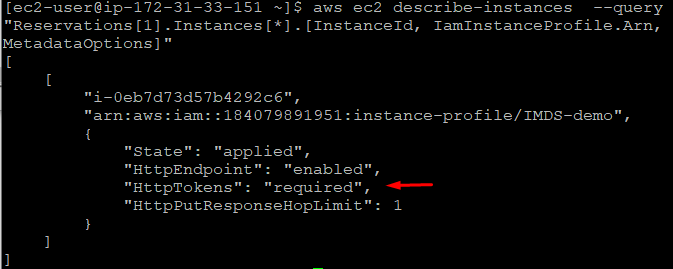
“i-0eb7d73d57b4292c6”,
“arn:aws:iam::[ACCOUNTID]:instance-profile/IMDS-demo”,
{
“State”: “applied”,
“HttpTokens“: “required”,
“HttpPutResponseHopLimit“: 1,
“HttpEndpoint“: “enabled”
}
So, let’s see what changed in the instance:
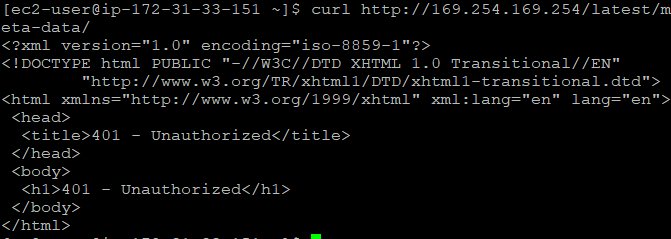
curl http://169.254.169.254/latest/meta-data/
<?xml version=”1.0″ encoding=”iso-8859-1″?>
<!DOCTYPE html PUBLIC “-//W3C//DTD XHTML 1.0 Transitional//EN”
“http://www.w3.org/TR/xhtml1/DTD/xhtml1-transitional.dtd“>
<html xmlns=”http://www.w3.org/1999/xhtml” xml:lang=”en” lang=”en“>
<head>
<title>401 – Unauthorized</title>
</head>
<body>
<h1>401 – Unauthorized</h1>
</body>
</html>
As you can see from the error, we are now restricted to working in IMDSv2 mode. Let’s issue the IMDSv2 get command as described in the EC2 instance metadata manual:

TOKEN=`curl -s -X PUT “http://169.254.169.254/latest/api/token” -H “X-aws-ec2-metadata-token-ttl-seconds: 21600″` && curl -H “X-aws-ec2-metadata-token: $TOKEN” -s http://169.254.169.254/latest/meta-data/instance-id
i-0eb7d73d57b4292c6
We see that the instance data is returned using IMDSv2 as expected.
Enforcing IMDSv2 for new instances
As mentioned, there is no native mechanism to make sure that every new instance is launched with IMDSv2 only, so we can automate the process. Let’s discuss a few use cases:
- Automation/orchestration/software code is used to launch new instances. This is a fairly simple use case as you would simply add the required metadata parameters to the AWS CLI run-instances command – –metadata-options or the equivalent API option.
- A new instance is launched by a user without requiring IMDSv2. Here the challenge is that this could happen in any region and we need a scalable and inexpensive solution. We can address this in several ways:
- Catch the fact that the instance was created without IMDSv2 restriction and point it to a Lambda function. Intuitively,“RunInstances” event seems to be the way to go, however, I found that using this event is unreliable as it occurs before the instance transitioned to the “running” state and was scheduled to run on a host. A more reliable approach I found was to use the “StartInstances” API event in a CloudWatch Event and point the target to the Lambda function. You can use the following event pattern:
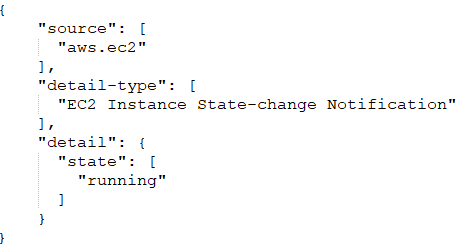
Then triggered, the Lambda function would read the InstanceId of the instance and force it to use IMDSv2 by modifying the metadata options. It is recommended to keep an option to skip enabling IMDSv2 for compatibility reasons. You can add a tag to the instance “IMDS”:”v1” or similar and have the Lambda skip enabling IMDSv2 on this instance and to track which instances in your environment are allowed to use IMDSv1.
Remember that CloudWatch and Lambda are regional resources, so they would need to be deployed per region. - If you don’t mind forcing IMDSv2 periodically, you can schedule a Lambda function to run on a schedule, e.g. every day. This Lambda can cover all regions and hence can be deployed only once.
- Another option would be to utilize a CloudTrail trail with events from all regions and save its logs into an S3 bucket. These logs could then be analyzed and once the “RunInstance” event is detected, the Lambda could be triggered. This solution is global and does not need to be deployed in every region. It would probably fit an organization that already has a solution to act on CloudTrail events (e.g. SIEM, Elastic, etc) and the only additional piece to add would be the Lambda function.
- Catch the fact that the instance was created without IMDSv2 restriction and point it to a Lambda function. Intuitively,“RunInstances” event seems to be the way to go, however, I found that using this event is unreliable as it occurs before the instance transitioned to the “running” state and was scheduled to run on a host. A more reliable approach I found was to use the “StartInstances” API event in a CloudWatch Event and point the target to the Lambda function. You can use the following event pattern:
- An Auto Scaling group (ASG) is launching new instances. Currently, the launch template option does support disabling IMDSv1 on launch while launch configuration does not.
As you see, there are numerous solutions to enabling IMDSv2-only support for your AWS instances.
Prevention
You can add a condition to your instance role that if the request is made to instance metadata service using IMDSv1, the request shall be denied. This can be done by adding to the policy of the instance role a condition, requiring that “ec2:RoleDelivery” value must be “2.0” – i.e. IMDSv2 was used for the request.
Choose the solution that fits your needs or brew your own!
Monitoring
AWS has created a dedicated CloudWatch instance metric called “MetadataNoToken”. It can be monitored to detect instances making calls to the instance metadata service without the IMDSv2 token. Once detected, you can locate the software responsible for these calls and update it to use IMDSv2.
If you have finished your transition phase and would like to find out if you still have instances not configured with IMDSv2 only, you can perform a DescribeInstances call in each region and check the “MetadataOptions/HttpTokens” field in the instance metadata from a management station.
Detection
A mechanism that cannot be overstated is GuardDuty. In case your instance credentials had been exfiltrated, GuardDuty will detect when the credentials issued to your instance had been used outside of the instance and raise an alarm – more info can be found here.
In addition, GuardDuty is an excellent mechanism to detect various security events in your environment, so it is highly recommended to use it, even if you are not worried about someone abusing your instance role credentials.
Conclusion
IMDSv2 does require some work to be fully utilized, yet it is definitely worthwhile investing it in order to reduce your instances’ attack surface.
Leonid Vinokur is Solutions Architect on the Cyberbit Range team. He is a certified AWS Solutions Architect – Professional, with over a decade of multidisciplinary experience in information systems.